Everything included in a ListingWebStudio website

Every feature of a ListingWebStudio website for brokerages and real estate teams, and which of the three plans carries it.

Pages that open instantly

Custom-coded pages served from the edge, 90+ PageSpeed guaranteed, even on a listing page loaded with photos.

Why speed is the first feature on a brokerage site

A brokerage site carries more images than almost any other kind of small business site: a gallery per listing, times however many listings are active. Every page is custom coded, ships almost no JavaScript, and is served from Cloudflare's global edge with images resized and delivered at the size the visitor's screen actually needs. That is what keeps a 24-photo listing page opening as fast as the homepage, on the day the site goes live rather than after someone audits it later.

What this looks like on a listing page specifically

The first photo above the fold loads first and at the right resolution for the device; the rest of the gallery loads as the visitor scrolls to it, not all at once. Map embeds and virtual tour links load only when a visitor reaches that part of the page. None of this requires you to compress your own photos before uploading them: the pipeline handles it on every listing, every time a listing is added or updated.

Available on: Listing Desk, Brokerage Floor, Portfolio Scale

A page for every listing

Active, under-offer and sold listings each get their own page, laid out as a bento grid of mixed tile sizes rather than one repetitive template.

What a listing page needs to do

A listing page has one job: answer the questions a buyer has before they call, and give an agent a page worth sharing. That means the price, status, specs, photos, map and the assigned agent are all above the point where a visitor gives up scrolling, and every listing gets its own indexable URL rather than living only inside a search widget that search engines cannot crawl.

The bento layout, specifically

Listings are laid out as unequal tiles rather than a uniform card grid: a featured or new listing gets a larger tile, a price-reduced listing gets a badge tile, and the rest sit at a consistent size underneath. On the listing page itself, the same logic applies to photos, specs and the agent card, so the page reads as a designed product rather than a stretched template with the address swapped.

Where the data comes from

Listing data is pulled from your IDX or MLS feed and rendered into these pages automatically, so a status change or price change on the feed appears on the site without anyone editing a page by hand. If you keep an inventory outside the feed, such as pocket listings or new construction units, those are added directly and behave the same way on the front end.

Available on: Listing Desk, Brokerage Floor, Portfolio Scale

A page for every market you cover

One page per city, town or neighborhood you serve, built for the searches buyers actually run before they contact a brokerage.

Why a shared search filter is not the same as a page

A dropdown filter on a single search page is invisible to search engines and to the buyer who searched "homes for sale in [neighborhood]" and landed somewhere else. A market page is a real, indexable page: a description of the area, the current listing count pulled live from your feed, nearby schools or amenities where relevant, and a path into the listings themselves.

How many pages, and how they are organized

We build one page per market you name during onboarding, typically the cities, towns and named neighborhoods your listings actually fall in rather than every zip code in a metro area. Pages are organized so a large metro gets a hub page linking to its neighborhood pages, which is what keeps a hundred-listing brokerage from ending up with a hundred nearly identical pages competing with each other.

Available on: Listing Desk, Brokerage Floor, Portfolio Scale

A roster page for every agent

Every agent on the team gets a real profile page with their own listings, specialties and contact path, not a single shared "our agents" paragraph.

What an agent profile page carries

Each agent gets a page with a photo, a short bio, their license information where you choose to publish it, the specialties or markets they focus on, and a live list of their current listings pulled from the feed. Enquiries from that page route to that agent specifically, which is the detail that makes a fifteen-agent site actually work as fifteen agents' worth of enquiries rather than one shared inbox.

How the roster page ties it together

A single roster page lists every agent as a card linking to their profile, filterable by market or specialty on larger teams. This is the page a new team member gets added to on day one, and the page that keeps a growing team from disappearing behind a single "meet the team" paragraph written when the brokerage was five people smaller.

Available on: Listing Desk, Brokerage Floor, Portfolio Scale

Enquiries routed to the right agent, automatically

A form filled out on a listing page reaches the listing agent; a form on a market page reaches whoever is assigned to that market.

Why routing matters more than a single inbox

A brokerage site generates enquiries from many different pages at once: a specific listing, a market page, an agent profile, or the general contact form. Sending all of it to one inbox means someone has to read every message and manually forward it, which is where response time goes from minutes to hours. Every enquiry carries the page it came from and the agent it belongs to, and routes there directly by API, Zapier or Make.

What you configure once

During onboarding you tell us which CRM or inbox each agent and each market uses, and we wire the routing rules once. Adding an agent later, or reassigning a market, is a single revision request rather than a rebuild.

Available on: Listing Desk, Brokerage Floor, Portfolio Scale

The listing lifecycle board

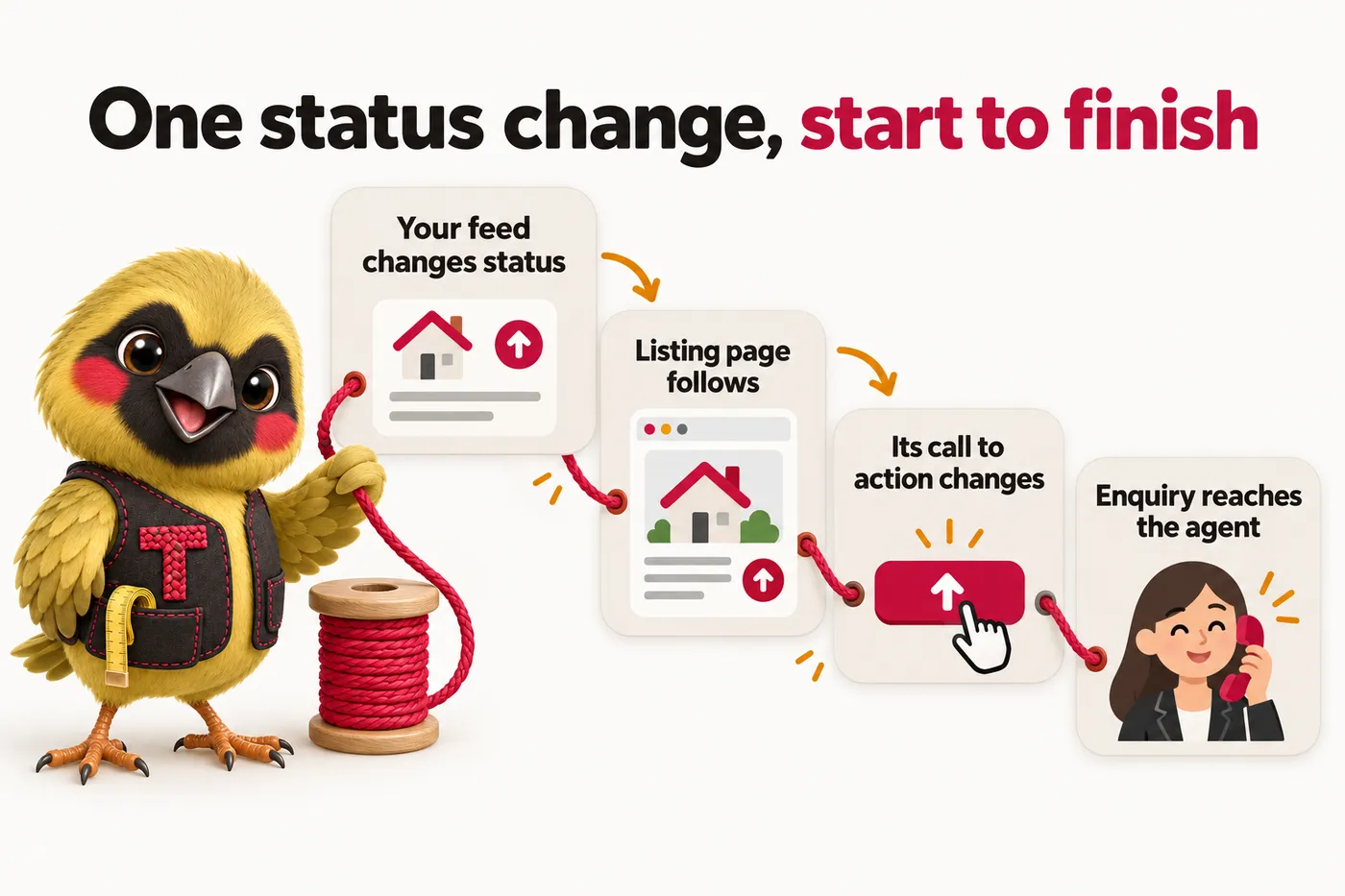
A real status board tracing a listing from coming-soon through active, under offer and sold, and what the page shows at each stage.

Why a listing is not one static page

A listing page has to say something different depending on where the listing is in its life: a coming-soon listing needs an interest-capture form because it cannot take showings yet, an active listing needs the full gallery and a schedule-a-showing call to action, an under-offer listing needs to stop soliciting offers while staying visible for search traffic, and a sold listing needs to close the loop and point to similar active inventory instead.

How the board runs on the site

The status your feed reports drives which version of the page template renders, automatically: the call to action, the badge shown on bento tiles across the site, and whether the listing still appears in market page counts. Nobody has to remember to swap a page manually when a listing goes under offer or closes; the site follows the status.

Available on: Listing Desk, Brokerage Floor, Portfolio Scale

Weekly detail updates

Prices, statuses, photos and market page counts get refreshed on a weekly cadence so the site never quietly goes stale.

What gets checked every week

Beyond the automatic feed sync, we run a weekly pass on details that need a human eye: agent roster changes, market descriptions that reference current inventory counts, seasonal messaging, and anything flagged by you since the last update. This is separate from a revision request; it is scheduled maintenance included in every plan.

Available on: Listing Desk, Brokerage Floor, Portfolio Scale

Researched market articles

Two to three articles a week, cited to named sources, covering the markets and buyer or seller questions your brokerage actually gets asked.

What the articles cover

Articles are written for the questions buyers and sellers search before they contact a brokerage: what a specific neighborhood is like to live in factually, how a local process such as a disclosure period works, or what a coming-soon listing means for a buyer. Every figure in an article is tied to a named, cited source. We never publish an invented statistic or a claim that reads as investment or valuation advice, because that decision belongs to you and your agents.

Cadence by plan

Tier one and tier two publish two researched articles a week at 2,500 to 3,200 words each; tier three runs the Content Engine at three articles a week, plus social image posts and short video content pulled from the same research.

Available on: Listing Desk, Brokerage Floor, Portfolio Scale

Managed Cloudflare hosting

SSL, CDN, DDoS protection and unmetered bandwidth included in the monthly fee, with nothing itemized separately.

What is actually included

Your site runs on Cloudflare's global network. SSL certificates renew automatically, the CDN caches your listing photos close to wherever a buyer is searching from, and DDoS protection and bandwidth are both included with no overage bill. There is no separate hosting invoice at any point, on any tier.

Available on: Listing Desk, Brokerage Floor, Portfolio Scale

The AI Engine

An AI receptionist and site chat that answers listing questions, books showings and hands anything that sounds like advice to a person.

What it answers, and what it does not

The AI Engine answers factual questions about a specific listing, books showing requests, and replies to enquiries across site chat, SMS, Messenger and Instagram around the clock. It is configured not to give pricing, valuation or investment guidance and to hand any such question straight to the assigned agent, because that judgment call belongs to a licensed professional, not to us.

What is included on tier two and above

A call-analysis PDF summarizes every call so an agent can read the gist in thirty seconds instead of relisting to a recording, and A2P 10DLC carrier registration for text messaging is filed on your behalf as part of setup.

Available on: Brokerage Floor, Portfolio Scale

Tier availability at a glance

FeatureListing DeskBrokerage FloorPortfolio Scale
Pages that open instantlyYesYesYes
A page for every listingYesYesYes
A page for every market you coverYesYesYes
A roster page for every agentYesYesYes
Enquiries routed to the right agent, automaticallyYesYesYes
The listing lifecycle boardYesYesYes
Weekly detail updatesYesYesYes
Researched market articlesYesYesYes
Managed Cloudflare hostingYesYesYes
The AI EngineNoYesYes

How the data actually flows

The same four-step flow runs behind every listing on the site, whatever plan you are on.

Your feed

IDX, MLS or manual entries in your client portal

Page templates

Listing, market, agent and roster pages

Lifecycle board

Status drives what each page shows

Your CRM

Enquiries routed by listing and by agent

Feature questions

How long until my site is live?

7 days on Listing Desk, 10 on Brokerage Floor while the AI agents are trained on your listings and roster, and 15 on Portfolio Scale with the content engine running. The clock starts at the onboarding call, not at purchase, so the sooner the form is in, the sooner you are live.

Can the site handle every listing our brokerage has active at once?

Yes. Listing pages are generated from your IDX or MLS feed rather than built by hand, so ten listings and a thousand listings involve the same setup work. Status changes on the feed, such as a listing going under offer, appear on the site without anyone editing a page.

What is the listing lifecycle board, exactly?

It is the logic that decides what a listing page shows based on its status: a coming-soon listing gets an interest form because it cannot take showings yet, an active listing gets the full gallery and a showing request button, an under-offer listing stops soliciting new offers while staying visible for search traffic, and a sold listing closes the loop and points to similar active inventory. The page follows the status pulled from your feed automatically.

What does the AI Engine actually do?

It answers factual questions about a specific listing, books showing requests, and replies to enquiries across site chat, SMS, Messenger and Instagram around the clock. It is configured not to give pricing, valuation or investment guidance and to hand any such question straight to the assigned agent, because that judgment call belongs to a licensed professional, not to us.

Does the AI Engine ever give buyers or sellers advice?

No. It is deliberately scripted to stay factual: listing details, availability, showing scheduling and general process questions. Anything that reads as advice, a valuation estimate or a negotiation question is handed to the assigned agent immediately, with the conversation history included.

What is the call-analysis PDF?

On Brokerage Floor and above, every call handled by the AI Engine is summarized into a short PDF so an agent can read the gist in about thirty seconds instead of relistening to a recording. It flags the caller's intent, the listing discussed and any follow-up requested.

See every feature running on real listings

Book a demo and we walk through a build close to your brokerage's size.

Book a demo